My First Six Months of Claude Code From Vibe Coding to Intentional Coding
- 7 minutes read - 1477 wordsVibe Coding
I first started hearing about vibe coding at the beginning of the year. Intrigued, I had to check it out. What I found were things like Lovable, which was very impressive! I was able to make a very respectable webpage within 15 minutes, and making changes to the webpage was as easy as describing what I wanted. Now I had to try actual coding!
Previously, I’d used Copilot in GitHub and integrated into my nvim configuration, and while it was very useful, it was basically a type ahead tool. It would help get me on the right track, or get started, but it couldn’t really help me create an application from nothing.
Then, I learned about Claude. My first forays with Claude were as encouraging as those with Lovable. I started by using Claude Desktop. It seemed to be a more capable coding assistant than Copilot. And shortly after trying it, I learned about MCP servers. So I decided to try testing a Kubernetes MCP server.
I figured that I could vibe code my way to a simple Kubernetes cluster running on my laptop, and was right! Here’s the short write-up I posted in LinkedIn about it:
I just did a quick PoC with Claude, minikube, and the Kubernetes MCP server. I had it create a small test cluster, which it did quite easily, and then asked if we could configure it to comply with NIST guidelines. It gave me several steps that I could do to secure the configuration. Very cool!
It took me longer to install minikube and kubectl on my laptop than it took to get a small cluster deployed
There are so many things we can to improve security by building secure in the first place. And there are so many data points that we can now stitch together to better identify security holes.
What else could I do with this? Could I vibe my way to an application?
Vibing an Online Application
I had a fairly ambitious project in mind that needed to use AI agents in one part of its pipeline. I also figured that I’d give Claude Code a try for doing the code development. The project has a web frontend, a database backend, and a pipeline to process videos to be published on multiple platforms. It turns out that this was an excellent project to learn how to use both AI agents and AI code development tools. The list of technologies used cover most common DevOps tooling, so I knew I’d be getting a good education and practical experience:
Technologies Used
- Infrastructure as Code: Terraform, GitHub
- CI: GitHub Actions
- Webfront end: Cloudflare Workers
- API: Cloudflare Durable Objects
- Database: Postgres
- Video Processing Pipeline: AWS Mediaconvert, AWS Transcription, AWS Lambdas, AWS SNS, AWS Bedrock
- AI LLMs with AWS Bedrock: Claude Haiku and Claude Sonnet
How It Started
I certainly didn’t know how the entire architecture was going to look when I started, but I had a good foundational idea in my head. I decided to use Gemini to work out the architecture. I began with the prompt of what I wanted the highlevel workflow to look like and what outcome I wanted, and then had about a 30 minute brainstorming planning chat with it. Gemini is very helpful for this type of work.
I took the output of this conversation and used it as the starting prompt with Claude Code
Look Ma, No IDE
I decided that I was going to use this as an experiment and I wouldn’t use an IDE or write any code myself. I wanted to see how far I could go vibe coding this thing. I was amazed just how far I could go - as anyone who spoke to me during the first couple of months of this experiment can attest to. I truly didn’t need to write a single line of code, and I didn’t.
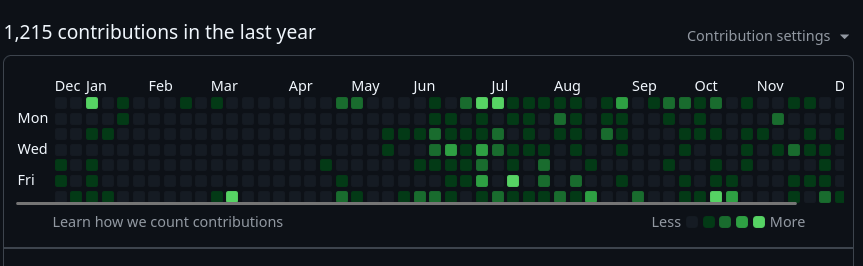
I have never enjoyed writing code beyond a simple script to solve a specific problem. Anything beyond that involved a significant amount of swearing at my computer, all the while knowing that it was right and I was wrong! So, for me to spend my free time after work and on weekends to write (direct is more accurate) this much code is a great indicator of how much fun I was having. A look at my GitHub profile tells the same story.
Reality Strikes - Vibe Coding Isn’t Sustainable
It was all very fun and exciting until I learned context management the hard way. If you haven’t learned this lesson yet, save yourself some time and aggravation and take the Claude Code in Action course. It’s free and will save you way more than the time you invest.
What does it look like when you don’t manage your context? You go round and round with Claude telling it the same things over and over again. You overwrite good code with bad. It makes crazy suggestions, known as hallucinations.
And even when you learn to be ruthless with the context by clearing it after every small task, you can still have a big system consisting of multiple subsystems that need to interact with each other, but it’s all too large for the context window.
How do you manage that? And how do you collaborate with multiple people using AI development tools to write and maintain the code base?
AI First Is Document First
It shouldn’t come as a surprise, but the answer is the same thing we’re supposed to be doing with our code: document it.
- What are we building? What’s the input and output?
- How do the sub components communicate?
- What are the message specifications?
- What is the naming standard?
- What case are we using?
I’ve lost literal days of my time due to not having these things documented. For example, in one system (and repo) Claude preferred camelCase, while in another it preferred kabab-case. I’d fix one, only to have it overwritten the next. More than once I went through this. I can be a slow learner. But when I learn lessons the hard way, I tend to get it.
How to Document for AI
I could write a very long blog post on just this topic, but here’s a quick summary.
You need to adopt some form of spec driven development. I recommend you take a look at spec-kit from GitHub as one option. It’s very thorough and probably too much for many cases, but at least take a look at it and use the parts that make sense for how you work. I especially recommend the CONSTITUTION.md. Time spent here is well worth it. It also includes considerable focus on creating tests.
A good set of specs and tests really speed up your code development
This is because Claude Code (in my case) can write the code to the specs, then run the tests, and fix its own mistakes. It knows what is expected and can deliver that.
How I Work
My most common pattern of working after having specs and tests, is to put Claude Code in plan mode and work through a plan for the task I’m on. Claude Code now has a built-in Plan Agent and Explorer Agent to assist with planning, and the improvement in the quality of the plans is noticable. It even asks clarifying questions without being prompted to do so.
- Save the plan in a
/plansor/docsfolder in your repo on a new branch i.e./docs/DEPLOYMENT_PLAN.md - Clear your context
/clear - Read (load) your plan and any other useful context files such as
README.mdandARCHITETURE.mdfiles into your context. You can load them with the@<filename>notation - Implement your plan
- Test using the tests you created earlier
- Commit, push, and create your PR
You can enhance this workflow a bit by using Claude Code GitHub Actions to do compliance checking of your naming standards, PR reviews, and security reviews. Tip: Claude Code security reviews are nice, but they do eat up a ton of tokens.
Get Started
I find that this workflow delivers a repeatable process that outputs working and sustainable code.
I hope you give these tools a try if you haven’t already. The rate of the improvement in their capabilities is tough to adapt to, and you can easily feel like you are falling behind and will never catch up. Learning to work with them as a team is also challenging and we don’t have good, solid patterns for this yet. But the best way to start to learn is to start. I’ve included some of my favorite learning resources below. Let me know if you have any favorites you’d recommend.
AI Learning Resources
- Anthropic Learning
- IndyDevDan YouTube channel of how to use AI Agents to create code
- NateBJones YouTube channel of frameworks and workflows for AI
- Using spec-kit with your existing projects